What are digital wedding invitations? A guide for couples
A digital wedding invitation lives on its own link instead of on card: guests open it in a browser, reply on the spot and add the date to their calendar, while you watch the replies arrive.
The short version
- A digital wedding invitation is a web page with its own link: guests open it, read the details, reply and save the date to their calendar.
- It is not a picture of an invitation. A picture cannot be replied to; a page with an RSVP form can.
- Guests need nothing installed and no account. If they can open a link, they can reply.
- Many couples also print a small card with a QR code for the few relatives who would rather hold something.
A digital wedding invitation is an invitation that lives on its own web link rather than on a card. Your guests open it in whatever browser they already have, read the same details a printed invitation would carry, reply on the spot, and add the date to their calendar. You watch those replies arrive as they happen, instead of collecting them by text and phone call over six weeks.
That is the whole idea. Everything below is what falls out of it once you look closely.
How is it different from sending a picture of an invitation?
A picture cannot be replied to. That difference is bigger than it sounds. If you design a lovely invitation and send it as an image, you have moved the design online and left the admin exactly where it was: guests still reply by text, in a group chat or in passing at a family lunch, and somebody still has to gather all of that into a list.
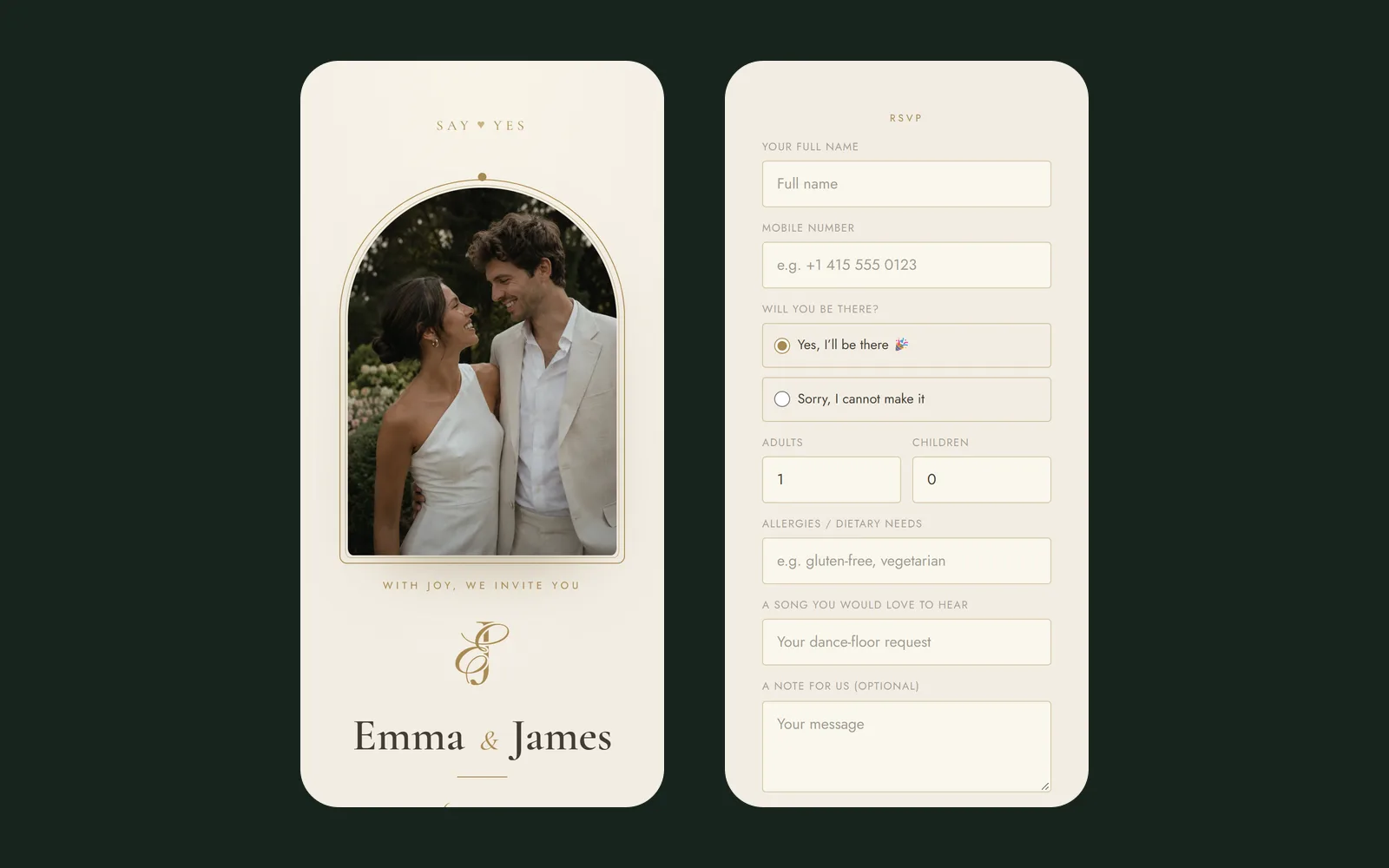
A real digital invitation is a page, not an image. It carries a reply form, a map, a calendar button and a schedule. When somebody replies, the answer lands in one place instead of in your messages.
What does a guest actually see?
- Your names, the date and the venue: the same things a card would say
- A countdown to the day, which quietly does the work of a reminder
- The schedule: when to arrive, when the ceremony starts, when dinner is
- A map link that opens directions in their own maps app
- A button to add the date to Google Calendar or Apple Calendar
- The reply form, with room for dietary needs, a plus one and a song request
Nothing to install, no account to create, no app to download. If they can open a link, they can reply.
What do the couple get out of it?
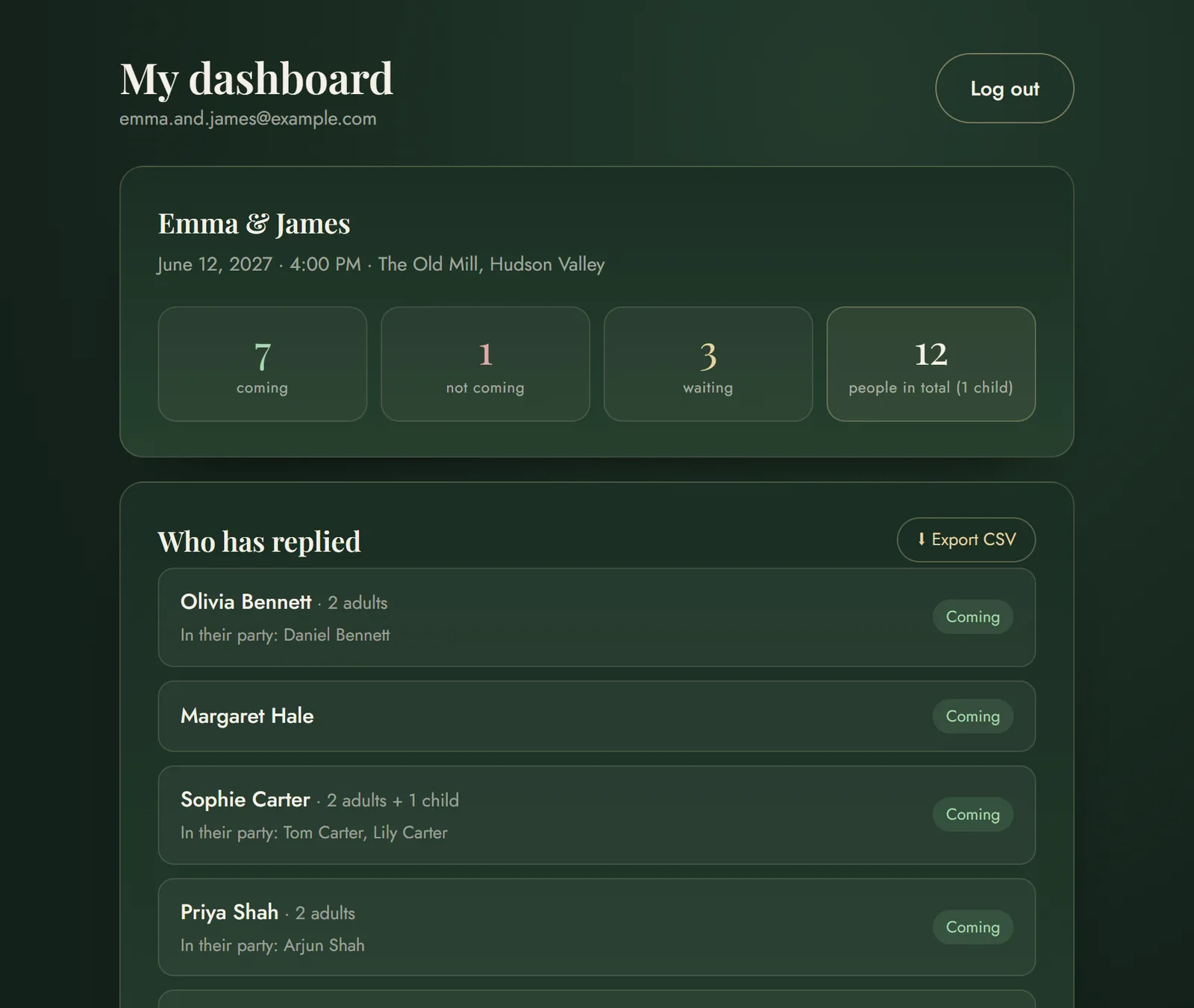
The honest answer is not the design, because you can have a beautiful design printed. It is that the reply arrives as data rather than as a message. Once a guest has told you they are coming with two people, one of whom is vegetarian, that fact can update your headcount, your seating chart and your cost per head without you touching anything.
It also means you can change details after sending. If the venue moves the start time by half an hour, you change it once and every guest who opens the link sees the new time. With print, that is a second mailing.
Do older guests manage?
In our experience yes, and far more easily than couples expect, because opening a link is something almost everyone already does. Two things help. First, keep the form short: every extra question costs you replies. Second, print a small card with a QR code for the handful of relatives who would genuinely rather hold something. It takes five minutes and removes the argument entirely.
Is it appropriate for a formal wedding?
That depends on the design, not the medium. A digital invitation can be black tie or it can be a party flyer. What matters is whether it looks considered: the typography, the restraint, the wording. Nobody has ever complained that an invitation was elegant but arrived as a link.
The medium is not the message. A cheap-looking card is still cheap-looking, and a beautiful page is still beautiful.
What does it cost?
Less than printing in almost every case, and the gap widens with the guest count: a digital invitation costs the same for 60 guests as for 300, while printing does not. What you should compare is not the design fee but the total: printing, envelopes, reply cards, postage, and the second print run for the addresses you got wrong.
Common questions
What is a digital wedding invitation?
It is a wedding invitation published as a web page with its own link, rather than printed on card. Guests open the link, read the details, fill in the RSVP form and add the date to their calendar, and the couple see every reply collected in one place as it arrives.
Is a digital invitation the same as sending a picture of one?
No. A picture cannot be replied to, so all the admin stays with you. A digital invitation is a page with a reply form, a map, a schedule and a calendar button, so a guest's answer becomes a line in your guest list instead of a message you have to write down.
Do guests need to install anything?
No. It opens in the browser they already have. There is no app, no account and no sign-up for guests.
Can we still have something printed?
Yes, and many couples do both: a digital invitation for everyone, and a small printed card carrying a QR code for older relatives who would rather hold something.
Ready to make your own invitation?
Build a digital invitation, open your RSVP and plan the whole wedding in one place.
Get started →