11 wedding planning tools that actually help (2026)
The tools couples really use to plan a wedding, from a shared spreadsheet and Pinterest to an invitation with an RSVP. For each one: what it is for, what it costs and where it falls short.

The short version
- Most couples need four tools, not forty: one place for guests and replies, one spreadsheet, one shared calendar and one folder for contracts.
- Almost everything on this list is free. The one thing free tools cannot do is send an invitation and collect the replies for you.
- The guest list has to live in exactly one place. Two lists that disagree cause more trouble than any wrong tool.
- A group chat with every guest is almost always a mistake; guest information belongs on the invitation.
Planning a wedding breaks down into twenty small jobs: the guest list, the budget, vendors, the seating chart, the timeline of the day, the music. Most couples run it through a notes app and five group chats, and somewhere around month three nobody knows who has confirmed what.
This list is an attempt to bring that down to tools that genuinely do the work. There are no paid placements on it, and every tool here is one we have used ourselves or watched couples use.
How we chose
The criteria come first, because without them any list is just a list:
- It works on a phone, because weddings get planned on the bus and in lunch breaks, not at a desk.
- Both of you can use it without being technical.
- It finishes at least one job completely instead of half-doing several.
- It is free or a one-off payment. A subscription paid for a year for an event that lasts a day makes little sense.
- You can both see the same thing at the same time.
1. Google Sheets: the guest list and anything you count
Free. The most useful tool on the list, and the one everybody underrates. One sheet for guests, one for the budget, one for vendors and their deadlines. You both see it at the same moment from any device.
Downsides: a spreadsheet sends nothing to anyone and has no idea who has replied, so you type every row in by hand. A guest list filled in by hand is always a day or two out of date.
2. Google Calendar: the deadlines nobody remembers
Free. The marriage license window, the venue deposit, the hair trial, the last day to give the caterer your final numbers. These are dates you will forget unless something rings.
Tip: create a separate calendar just for the wedding and share it with your partner and whoever is helping most. Wedding tasks stay out of your work calendar, and you can hide all of them with one click when you need a quiet evening.
Downsides: there is no list of tasks by stage. A calendar knows when, but not everything that has to happen before then.
3. Say Yes: the invitation, the RSVP and a guest list that fills itself
From $49, paid once. This one is ours, so read it with that in mind. It covers the part a spreadsheet cannot: guests reply on the digital invitation itself, add their plus one's name and their dietary needs, and the guest list fills in without you typing anything. Alongside that come one-tap reminders to the people who have not replied, a seating chart, a budget calculator tied to the confirmed head count and a planning checklist.
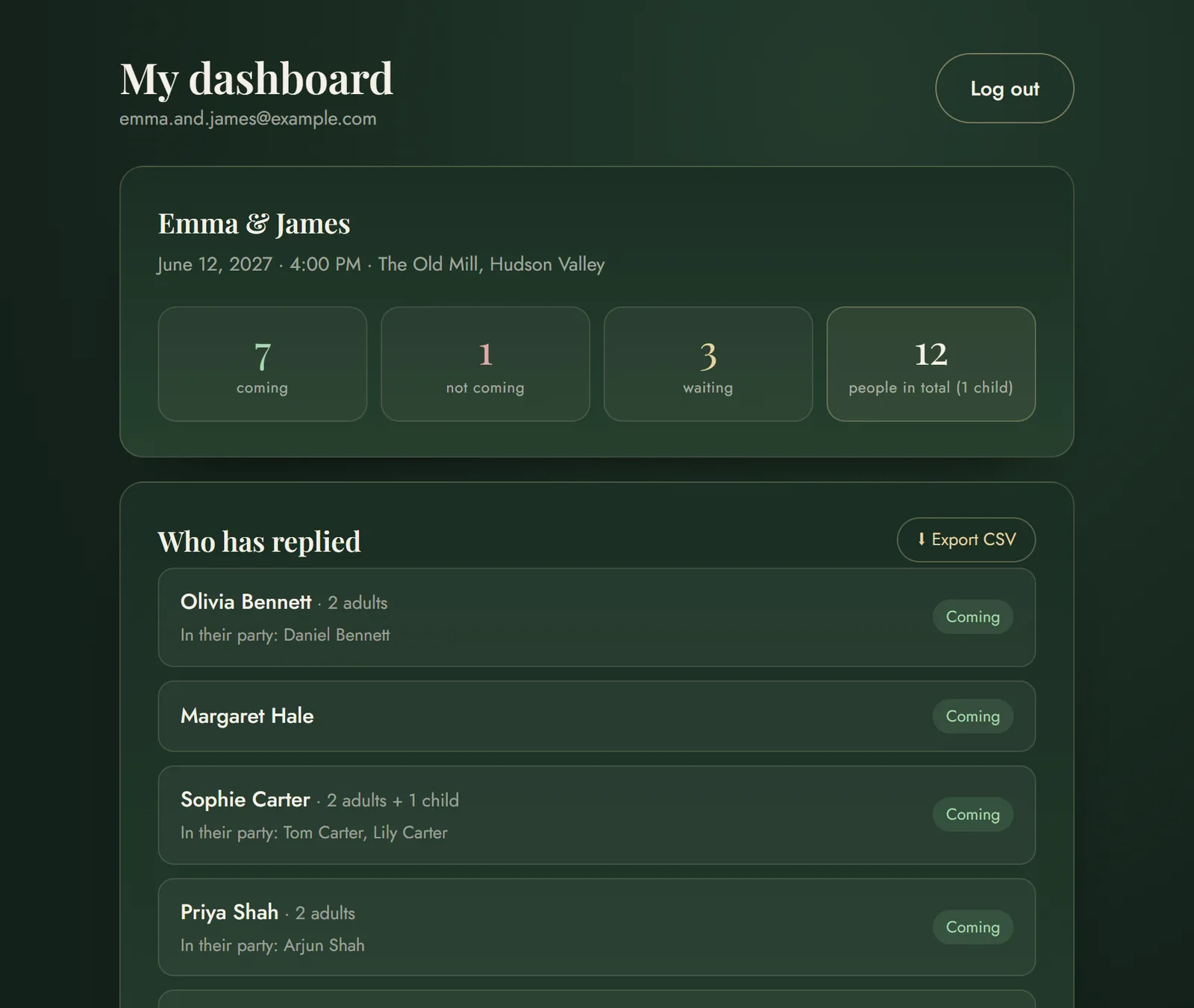
Downsides, honestly: it costs money (the save the date is free, the invitation is not), the Wedding plan stops at 150 guests, it does not track vendors or contracts, and there is no app to install, so everything runs in the browser. If all you need is to collect replies and your invitations are already printed, a plain form is cheaper (number 11 on this list).
4. Canva: signs, menus and anything you print
The free version is plenty. The seating chart board at the entrance, place cards, bar signs, the dessert table, thank-you notes. The templates are ready; you change the words and the colors.
Downsides: it is easy to lose an hour choosing a font. Set yourselves a rule of two colors and two fonts for the whole wedding, and stick to it everywhere.
5. Pinterest: agreeing on a style without an argument
Free. The real value of Pinterest is not inspiration but a shared language. Instead of debating what "elegant" means, you both save pictures to the same board and the difference shows immediately. Then you show the same board to the florist and the photographer and skip half the explaining.
Downsides: boards are full of weddings with budgets nobody mentions. Keep to what is possible at your venue.
6. Google Maps: touring venues and directions for guests
Free. While you look for a venue, save the candidates to a list of your own on the map. You see them all at once and know straight away how far each one is from the ceremony and from the hotels.
Later, put a link to the exact location on the invitation, instead of an address someone has to retype into their navigation.
7. A group chat, but only one, and only near the end
Free, in WhatsApp, iMessage or whatever your family already uses. One chat with the wedding party and the parents, opened about a month before the wedding, with a pinned message holding the timeline of the day and who is responsible for what.
Downsides: a chat with every guest is almost always a mistake. It turns into a hundred messages about parking and nobody can find anything. Information for guests goes on the invitation, not in a chat.
8. Google Drive: contracts and quotes in one place
Free up to 15 GB. One folder, with a subfolder per vendor: venue, photographer, music, flowers, transport. Every quote and contract goes in the same day, even if it is just a photo from your phone.
Why it pays off: when there is a misunderstanding about what was agreed, the quote from eight months ago is the only thing that counts. You will never find it in a message thread.
9. Spotify: music for the DJ without the back and forth
Free. A shared playlist you both add to all year, plus a separate short list of songs you do not want to hear. The DJ values the second list as much as the first.
If you are collecting song requests from guests too, ask for them on the RSVP form. Then they are all in one place instead of scattered across messages.
10. Phone reminders: for the week of the wedding
Free. The last week is dense, and that is when mental lists fail. Make a list of things to pack and bring (the rings, the marriage license, a spare pair of tights, a charger, cash for tips) and share it with the person helping you on the day.
11. Google Forms: an RSVP if your invitations are already out
Free. If the invitations are already printed and mailed, a form is the quickest way to still get the replies in one place: questions about attending, party size and dietary needs, with the answers dropping into a spreadsheet.
Downsides: it looks like a work survey, not part of the wedding, and guests open it as a separate link. There are no reminders, no plus-one names unless you plan for them, and nothing connects to the rest of your planning.
What you do not need
Knowing what not to spend time on is just as useful:
- A separate wedding website on top of the invitation, if the invitation already carries the schedule, the maps and the RSVP. It is the same content at a second address.
- Monthly subscriptions for an event that lasts one day.
- Five tools for the same job. The guest list can exist in exactly one place, or none of the copies is right.
- A tool you have to teach your partner. If only one of you can use it, only one of you will.
The minimum set: four tools and you are done
If you pick only the essentials, this combination covers the whole of the planning:
- One place for guests and replies: an invitation with an RSVP or, if your invitations are already out, a form.
- One spreadsheet for the budget and the vendors.
- One shared calendar for the deadlines.
- One cloud folder for contracts and quotes.
The most expensive planning mistake is not the wrong tool. It is two guest lists that disagree.
Common questions
What are the best tools for planning a wedding?
For most couples four are enough: a digital invitation with an RSVP to collect replies, a spreadsheet such as Google Sheets for the budget and vendors, a shared calendar for deadlines and a cloud folder for contracts and quotes. Canva for signs, Pinterest for agreeing on a style and Spotify for the playlist are the most common additions.
Is there a free wedding planning app?
Google Sheets, Google Calendar, Google Drive, Google Forms, Canva and Pinterest are all free and between them cover the guest list, the budget, deadlines, documents and design. What none of them does is send an invitation and collect the replies automatically; for that you need a digital invitation platform.
Do I need a special app for the guest list?
Not necessarily, but the guest list has to live in exactly one place. A spreadsheet works if you type in every reply yourself; if you would rather not, use an invitation with an RSVP form, where the list fills itself from the guests' answers.
How far ahead should we start planning a wedding?
The venue and the photographer are usually booked 9 to 12 months ahead because they are the most in demand, invitations go out 8 to 10 weeks before the wedding, and the caterer wants the final head count 7 to 10 days before the day.
Is a group chat with all the guests a good idea?
No. A chat with every guest quickly becomes impossible to follow and the important details get buried. Guest information (the timeline, the venues, the dress code) belongs on the invitation; keep a chat for the small group running the day.
Plan it all in one place
A seating chart, a budget and a checklist that follow your guests' replies, alongside your invitation.
Start planning free →